Tuesday, September 28, 2021

A Life at the Keyboard

Having recently retired, I find myself looking back over the past forty-five years in the tech industry, including over thirty as a software engineer. It's been a great ride, with a few unexpected turns.

First of all, I didn't start as a software developer. When I went to college in the seventies, there was no undergraduate degree available for Computer Science at the university I attended. As such, I decided to go with one of my first ideas in High School: Physics. It turns out this was an excellent choice given my long term goal of doing computer software development.

However, maybe I should back up for just a bit and explain why I had an interest in CS in the first place.

Revolutionary Ideas

Growing up, I had an immense interest in science. I asked for and got a small telescope when I was young and spent hours at night with my friends marveling at the Moon and just making out the rings of Saturn. The tech industry was just getting started in the nineteen-sixties. I don't even think the term high-tech was in use yet. However, there was a fantastic television series that I watched with great interest, Star Trek.

You need to understand what was going on at the time, and the radical idea that Gene Roddenberry had come up with. In the middle of the cold war, the threat of nuclear destruction or societal breakdown seemed almost inevitable. At least to the young people of the time. Sound familiar?

However, Gene Roddenberry had the temerity to suggest that in the twenty-third century, human-kind would still be alive. More than that, he said we would be thriving in a grand adventure across the galaxy. It was pretty fantastic stuff at that time. Perhaps even at this time.

However, the part that caught my attention in Star Trek was the technology. Not just warp drive and transporters, but handheld communications devices that could go anywhere with a person. Computers you could talk to. Remember, at that time computers were things owned by big companies, unreachable by the average person.

The other cool thing was the way Kirk and Spock would come up with ways to solve problems using science and scientific thinking. In school each day facing challenges and tests I would find myself asking, "what would Spock do?" Moreover, it often helped me figure out solutions. I read and learned about the scientific method and critical thinking. Life lessons that would make a profound difference for me.

And Great Heights to Reach

Of course, we also had the "Space Race," as well. I was obsessed with NASA and everything going on with the space program. I followed Mercury, Gemini, and Apollo with intense interest. I kept a lockbox I filled with clippings, books, and magazines I read. If it was about the astronauts or the missions, I was all over it.

How could one not be excited? Star Trek was telling us about a future in space, and NASA was building it.

It's interesting that now at the time of my retirement from the tech industry, we are celebrating the 50th anniversary of the first landing on the Moon. A mark in history that forever changed who we are. No longer stuck on a single world, we are now capable of exploring and, I hope, eventually living on other worlds.

From Big Beginnings

Another major inspiration in my younger life was my high school math lab. In the lab, in those days, we had a large teletype terminal, which connected via an audio modem to the school systems time-sharing mainframe. Students were allowed to use this device to check out what a computer was capable of doing.

We had very little instruction in class, but there was a couple of manuals next to the terminal. One of which, a reference manual for the BASIC programming language started filling up all of my time. One day, I spirited the manual out of the lab for a weekend so that I could read the entire thing in my spare time. Of which I had a lot as a young teenager at that period.

My friends and I spent hours playing with the computer, finding odd languages like Fortran, Cobol, and even SNOBOL. However, I went through the BASIC reference manual and tried out every command, eventually writing small programs, experimenting with what I could make a computer do. At the time this meant the use of lots of paper, as the only way to get output from the mainframe was via the large roll of paper attached to the teletype. Even more fun was the fact that we could write programs while offline, via a paper tape machine connected to the teletype. We could then dial into the computer and enter our programs with the paper tape, which saved on connection time for the busy school system computer.

We got a field trip to the location where the district computer resided. Seeing the large mainframe, and several smaller "mini-computers" that worked with the mainframe was quite a treat. One of the operators showed us a program he had created that allowed him to run a race with a car that appears as an asterisk (*). The objective was to keep the "car" between two curving lines drawn on the sides of a roll of paper. He changed the direction of the car via a simple switch on the mainframes front panel. The challenge was to keep the little car between two ever-changing lines on the sides of the paper. We each got a chance to try our hands at "driving" the race car. I'm sure several hundred feet of paper were spent for our enjoyment.

I still remember the magic of connecting to that room-filling machine and having it do what I asked with the simple programs I created.

To small accomplishments

During my years in College in the nineteen-seventies, I played with other mainframe computers through more paper-friendly CRT terminals. These often whetted my appetite. However, I didn't have the time to explore my interests further as I had set myself to get degrees in both Physics and Mathematics. Why did I decide on two degrees? It seemed only natural since getting the Physics degree meant I would already have over eighty percent of the Math courses needed for that degree.

During that time, my friends who appeared to have more free time studying English and Political science brought me news of a new set of computers based on microprocessors. Small computers that sat on a desktop, yet had nearly the same power as the older huge mainframes I had first seen. The thought of having my own computer for personal use intrigued me a great deal. If ever I could afford such luxuries.

In the late nineteen-seventies I saw my first "personal computer" in a Radio Shack store. It was the now (in)famous TRS-80 Model 1. There was an encouraging sign that asked people to "Try It Out!" with a few instructions that you could type. I was happy to see these were in BASIC. I tried a couple of their examples and a few of the small little programs I could remember using back in high-school.

It was a fantastic experience. I remember looking around to find only the power cord plugged into this system. It really was a self-contained computer. Capable of doing what the system I had used before had done. With the immediacy of results appearing on the screen as soon as I typed a command.

I had to have one

However, the question quickly came up: Which one? In 1980 when I had the money I needed to purchase a computer. However, there were already several options available commercially. In a few years, the world had gone from large machines costing hundreds of thousands of dollars or more, to an array of personal computers available to just about anyone.

Discussions with my friends led to the personal decision to get the Apple ][ Plus computer primarily because it provided color graphics at a time when most machines were still monochrome.

I spent hours writing software for the little machine. During my college years, I had been introduced to the first Role Playing Game (RPG) Dungeons & Dragons. I spent much of my free time playing and eventually running games myself. So it's no surprise that one of my first computer programs was to help me with many of the tasks involved with running the games. I probably spent more time on that program over the next several years than any other program I have written for my personal use.  I only wish I still had the code.

Little Silicon Chips

My first job outside of college was in the fabrication of silicon chips. However, the silicon we were making were for power transformers and transmission. Small chips that might go into a computer power supply, and much larger pieces used in power plants and major power transmission lines. Diodes capable of handling as much as 10,000 Amps(!)

It was a fascinating time, working in a cleanroom and learning first hand the processes for making diodes, transistors, and thyristors. We were on the cutting edge of a new Gallium-Arsenide production technique. Very cool yet hazardous stuff.

However, my interest was more on the side of the automation processes. Computers that controlled testing devices were being introduced in our company. I became interested in these devices. Especially as it turned out that they used BASIC even then. It was almost a sign.

At the same time, I introduced my engineering buddies to their first look at a personal computer when I brought my Apple to the office. The hit of the party was a spreadsheet (VisiCalc). Which we started using to track the quality of different stages of our production process.

IT becomes an obsession

While spending what free time I had, I began teaching myself other programming languages. Pascal, C, Forth. I enjoyed seeing how each language used different syntax to achieve the same things. In the process, I learned the internal details of how CPU, Memory, and Peripheral's all interact at the lowest levels.

At the same time, I found my co-workers anxious to learn how these computers worked and how they might use them for their own professional and personal improvement. I started teaching classes in basic computer usage, as well as programming. I was also introduced to early computer magazines, that not only needed readers but writers as well. I ended up writing for several periodicals from the time. Most of which no longer exist.

By now, I realized I was far more interested in developing software than I was with working on silicon chip design. In fact, most of the chip work was moving to Japan and Korea anyway.

When a funny thing happened

At the time, I was still working on automating systems for manufacturing, and keeping myself up to date on new developments in Physics. When I ran into a remarkable ad in the PhysResLets (Physics Review Letters). It was posted by a newish company called Microsoft. The ad was looking for software developers and said they were explicitly advertising there because they had found a significant number of their current programmers were trained in Physics. It turned out that the skills for thinking in abstract terms and logical problem solving crossed over the two fields.

However, I wasn't all that interested in moving to Seattle, and they had few jobs elsewhere at that time.

To make a very long story just a bit shorter, I found a job in a telecom business as a software engineer. I'm delighted to say that despite having learned everything I knew about programming by teaching myself, I passed their application tests with high marks. I managed to beat out dozens of other candidates at the time, and landed my first real job as a professional software engineer.

Of course, that's not really that hard in this industry. Most professionals are aware that the number of competent software engineers is tiny compared to the number of jobs available.

Part 2? 

The rest, as they say, is history. 30+ years writing software in various small and large businesses. The best part, for me, was the constant learning curve. New technology and new people with new ideas every day of every week. It's an exciting industry for those that have the willingness to learn.

Thursday, May 1, 2014

This Game IS Rocket Science

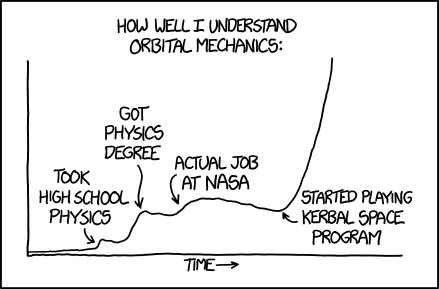
When I had first heard of Kerbal Space Program (KSP) via an advertisement in Steam, I pretty much ignored it. My first reaction was that it looked like another real time strategy game, Civilization in Space. However, after seeing this comic from the famous XKCD site:

How well I understand orbital mechanics.
XKCD.com/1356 (Creative Commons)
I decided to have another look.

As a kid I followed the space program from Mercury to Apollo with intense interest, and even tried to master the mathematics of orbital mechanics well before getting my degrees in Math and Physics. So when I saw this my curiosity was naturally piqued. 

After some further reading I quickly grabbed the game from Steam and have been nearly obsessed with it ever since.

What is the Kerbal Space Program? In a nutshell it is one of the most advanced space simulators available on a home computer, but with a sense of humor. Rendered in beautiful 3D worlds in space. While the game has a deep physics model and all of the advanced math of real world space travel, it doesn't take an actual math degree to play. In fact the interface can be mastered by just about anyone with a couple of hours of playing around. As long as you don't worry overly much about the lives of your intrepid Kerbalnauts. There are built in tutorials, but to be honest, the game is one big sandbox with little or no objective other than the desire by you to want to successfully explore the Kerbin universe which gives you quite a lot to explore indeed.
Opening screen sums up the humorous side of KSP.

You can think of yourself as the director of your own space program. You have a myriad of components from (un)manned capsules, fuel tanks, liquid fuel engines, solid rocket boosters, batteries, solar panels, landing struts/gears and docking collars. There are even various science packages that will allow your kerbalnauts to carry out experiments throughout the system as you explore. Measure everything from temperature, atmospheric pressure and seismic phenomenon to gravitational fluctuations in the region of the moons and planets you have available to explore.

You can build a one man lander to take to a moon and back as a single package, or you can completely simulate the original American space program, creating both Command and Service Module with a separate Lunar Excursion Module for landing one or more more kerbals on the Mun.

Oh and by the way, unlike Earth Kerbin has two natural satellites: Mün and Minmus. That's just the start of what is an intriguing and satisfyingly large number of places to explore in KSP. Of course, you will first have to master the intricacies of obtaining orbit, and launching your ships to greater and greater distances along the way.

And that is where KSP really shines. The physics model is extremely accurate. At least within a couple of sigmas of real world physics. Within a few hours you will be thinking in terms of Delta-v, Thrust to Weight Ratio (TWR) and escape velocity. You will learn how to determine if a ship is capable of entering orbit, or going further. You will learn why getting away from the home planet means overcoming not just gravity, but the density of the atmosphere. Most importantly, you will learn why you must trust and use the Navigation ball and not your own intuition. You'll learn when faster is slower and lower is faster.

Of course, if you simply want to get there quickly, there are a myriad ways to do that. Besides being an intricately detailed orbital mechanics simulator, KSP is also an open sand box. Meaning that others can play by providing third party addons and modules. These come everywhere from modules with a few additional parts to make even more kinds of space craft to advanced guidance and control systems that can calculate and even auto-pilot your ship to anywhere you wish.

While I love the diversity and creativity that the community has provided to KSP, I personally have preferred playing the game with little or no extras until I have mastered each flight dynamic on my own and can say I did it without assistance. Of course, that is a matter of personal preference, and others should feel perfectly Okay to go about directing their own space program in any way they wish. It seems to me that if NASA in the 1960's had systems capable of simulating even a tiny fraction of what KSP offers, they would have gladly jumped on the opportunity.

That said, I do highly recommend that anyone hopping into this game take the time to watch one or two tutorials on the Web. I found things that the KSP interface allowed me to do that I probably would never have figured out on my own. YouTube is a good place to start, but there are also a number of great tutorials on the KSP forums.

And I haven't even mentioned that KSP doesn't just offer rocketships to outer space. Their is also an elaborate aerodynamics model in the software. So you can design and fly any number of aircraft in and around Kerbin and a few other places with sufficient atmosphere.

KSP is available for direct download or via Steam. The price is currently under $30. Steam offers a small warning that the game is in Beta. However, the game has been under constant development since it first was "released" by Squad several years ago. They provide new updates with added features and functionality every few months without extra charge. Which seems to me to be a very good thing. There is also a free demo if you just want to see what it looks like on your own computer.

It's a single player game, but if you do give it a try, please drop me a line and let me know what you think. And remember to send along some postcards from your explorations.

I hope to see you on the Mün!


Saturday, September 7, 2013

Why Microsoft CEO Steve Ballmer Had to Go

An excellent post on The New Yorker magazine's website by Nicholas Thompson has done a great job of spelling out Why Steve Ballmer Failed at a high level. The label of "The Anti-Steve Jobs," seems spot on. Given the extraordinary resources we must imagine a man in Steve Ballmer's position must have, it seems incredible that he missed or misunderstood the importance of such innovations as the iPhone and iPad. Microsoft's dedication to riding the money train of the company's number one and two cash cows (Windows and Office) can be traced directly to decisions made by the Microsoft CEO. Now that the money train has started to run into some of the early signs of losing steam, the strategies of Steve Ballmer must be called into question, as they have by many investors and analysts for several years now.

But I would like to dig a bit deeper into the decisions that have left Microsoft making Hail Mary plays, like this weeks announcement to buy Nokia, or last years decision to make their own hardware with the ill conceived Surface RT and slightly better Surface Pro. Because I believe that it is not just the big strategy decisions, but even the little ones where Microsoft has failed. Which may be a cautionary tale as we watch the company go through its changes in the next five to ten years.

Take Windows Phone for instance. Some of us remember that Steve Jobs did not invent the smart phone when he gave us that "One more thing..." speech to introduce iPhone. Many companies had early versions of smart phones years before Apple decided to compete. Microsoft had a sizable share of the market with the older "Windows Mobile" devices. Despite it's popularity with some business users, it was never seen to be a very lucrative marketplace.

After Apple proved that there was a market for such devices, and it was a large and fairly high end market indeed, Microsoft went through classic signs of grief with denial, anger and reluctant admission that they had missed the boat. However, to their credit they did not simply throw in the towel, and they didn't make the mistake of trying to convince a new and hipper generation that the old Windows Mobile devices were the solution.

Instead, they took the time and with great fanfare, they released Windows Phone 7. A remarkably stylish device, with an interface that looked nothing like Apple's or Google's devices. Many critics hailed it as a breakthrough in touch interface design, and the phone won many awards for innovation. It seemed Microsoft still had some magic up their sleeves.

Still many people worried that the software giant could not keep with the number of regular updates that Apple, and even more so Google, were capable of putting out. As with all technology, it wasn't just about the newness, but how fast you can make improvements and keep the experience fresh to get users excited. When the first update to Windows Phone 7 was delayed, and delayed again, there was an uncomfortable feeling going around the tech community that had cheered Microsoft's re-found mojo.

But when Windows Phone 7.5 (Mango) was released, there was a collective sigh of relief and more vendors jumped on the Microsoft wagon. At least for awhile. Microsoft announced that a major upgrade to the software would come in the form of Windows Phone 8.

The bad news was that none of the Windows Phone 7 hardware would be able to run the new mobile OS. That included recently released hardware that consumers had purchased just weeks before the Windows Phone 8 announcement. Microsoft promised a 7.8 release for the older phones. It was supposed to contain some of the new features for the older phones, and was released a few months after the new Windows Phone 8 devices hit the marketplace. Unfortunately, there seem to be some customers that still have not received the 7.8 upgrade. Trouble in the garden?

At the same time, Steve Ballmer announced that Windows 8 would be the new Desktop OS that would also run on a new line of tablet devices featuring a modified version of the Metro UI from Windows Phone 7/8. Microsoft would, finally, be competing with the incredible iPad.

The first of these devices were released in the last quarter of 2012, and featured a version of Windows called simply RT. These devices would only run special apps designed specifically for the new Metro UI style and available exclusively through the new Windows Store, which would complete with Google Play and the AppStore for iOS. While standard windows applications made to run on Windows 7 would not run on RT, Microsoft did include a special version of Microsoft Office for the new tablet computers. If that's seems confusing, it was, and many people were surprised to find that this special version of Windows didn't seem to be Windows at all.

Adding to the confusion was the fact that in early 2013 Microsoft released the Surface Pro which would run a full version of Windows 8 just as on a Desktop or Laptop computer. Meaning that most of the software that had run on Windows 7 would run on the Surface Pro's Desktop while the RT applications would run in the new Metro UI. Well most of the RT apps that is. Some would be incompatible with Pro and some Pro apps would be incompatible with RT.

Making matters worse, the Surface platform was not compatible with the Windows Phone platform. Therefore Apps that users purchased on the Windows Phone store had to be purchased again in the Windows store for Laptops or Surface tablets, if the same app was even available for both platforms. To understand how big of a problem this is, consider that the Apple AppStore features software that runs on both iPhone and iPad. Many applications are made to give the same look and feel but offer more or less features depending on which iOS device was being used. Google's Play store works pretty much the same way for apps purchased for Android phones or tablets.

In other words, the Surface tablet is treated more as a desktop or laptop replacement, and users are expected to buy software made specifically for those devices. However, this completely ignores the fact that many people who are buying smart phones and tablets are leaving the laptop or desktop at the office. In many cases these people are leaving the desktop completely. When they are on the go, they believe that the mobile devices they purchase all work the same, and more importantly they have been taught by Google and Apple to believe that once they purchase an application for one of those mobile operating systems they can use them on any device with the same system. For these types of users the Microsoft Windows Surface and Phone experience end up being different and they must be confused and frustrated to find that they aren't sharing the same store for their purchases.

In fact the problems of the Surface compatibility and performance forced Microsoft to take close to one billion dollars in a write off on their latest quarterly earnings report while they dumped the remaining inventory of the Surface tablets. While they plan to release a second version of both Surface RT and Pro to address some of the performance concerns, it is unclear that Microsoft has understood the other frustrations of its users.

These are just a few of the most recent examples that show how Microsoft and Steve Ballmer in particular have made mistakes both large and small even with their newest and most innovative products. I think it proves beyond doubt that Steve Ballmer just does not get the new technology world in which we live, and that is why he had to leave Microsoft if the company is ever going to have a chance of competing with the new technology titans.

Monday, April 29, 2013

Microsoft's "Modern UI" Failure

What if they created a new User Interface paradigm and nobody cared? What if "they" were Microsoft?

As I've talked about in previous posts, the new Modern UI (formerly called Metro) that Microsoft has made part of their latest operating system has widely been panned by the Tech industry. It's also getting ignored by most consumers and businesses. The general consensus is that the new interface is fixing problems nobody is having. Why has Microsoft insisted on making the new Modern UI such a priority? Because they see it as a bridge to get people to try the interface and if they become comfortable enough, they might also like to try other devices using the same UI. In other words Windows Phone 8 and the new Surface line of tablets.

I've said it before, but analysts seem to agree, the new OS is not selling well. Several of Microsoft's long time partners have poo-pooed the new OS because they believe it has lead to a sharp decline in Personal Computer sales.

There are a lot of reasons that people dislike the new OS, including the fact that they completely eliminated the "Start Menu" and made it nearly impossible for users to avoid using the new UI if they prefer the traditional desktop. I wrote about the problem and rumor's of Microsoft's half-hearted fix to the problem last week.

But there are a lot of other reasons that Microsoft has had a hard time selling the new UI. Chief among them is the new Modern UI applications that Microsoft released when they released Windows 8. If you were one of the few to upgrade to Windows 8 last year, you probably were left wondering if the new applications were bad by design or if they were merely unfinished.

For example, the Mail application didn't allow you to select multiple messages to delete or move. In fact, there were no Folders in the Mail application at all, making it impossible to properly organize your Inbox. For people who had used free email clients from Microsoft in the past (meaning Outlook Express) the new Mail app delivered with Windows 8 felt extremely limited. That was just one example.

Microsoft has since released a set of updates to many of the Modern UI applications through their new Windows Store, but in some cases the "updates" removed functionality. For instance, the Calendar application lost the ability to sync with Google Calendar, leaving thousands of new Windows 8 users with no alternative except to try third party solutions.

And lets face it, the third party applications available from the Windows Store are very hit and miss. Mostly miss. A survey of most of the reviews in the Windows Store leads one to believe that developers aren't convinced that the new Modern UI is going to be viable long term.

Microsoft is the company that has always prided itself for having the best developers and the best catalog of third party and in-house applications for their Operating systems, so the situation with Windows 8 is doubly confounding. It seems amazing that a company with the internal resources and a list of the best ISV's on earth has found itself in such a situation.

Microsoft has placed a big bet on their flagship OS by stating to developers and customers alike that the new UI is the future of the OS. That they have done such a shoddy job of implementing the applications most people will use first after an OS upgrade speaks volumes about the lack of direction the company has had in recent years.

Saturday, April 20, 2013

Microsoft will fix Windows 8, almost

The Tech press was again abuzz this week with leaks from Microsoft saying that the Start button would be returned to the Windows 8 desktop. And that's not all, sources also said that with the release of updates code named "Blue" the users will have the ability to boot directly to the desktop. Thus avoiding the Modern UI (aka Metro) entirely.

And there was much rejoicing. Nearly everyone from tech pundits to consumers to large enterprise IT departments have lamented Microsoft's original decision to make the new Modern UI the default interface for users and push the old desktop interface deep into the background. But an even bigger problem for many users was the decision to drop the Start button entirely. Not only did it make things more confusing, but for many first time users of Windows 8 it provided no easy way to discover how to get back to the Modern UI once they had found the desktop. Which is what Microsoft kind of wanted in the first place. They want people to use the Modern UI to the extent that they get used to it and then maybe they will want to use the same UI for their tablet and smart phone devices. Making Windows 8 a gateway to Windows phone and Surface tablets.

If they are bringing back the Start button, it seems like a good idea. Microsoft finally heard all of the complaints that the new Modern user interface was not merely a steep learning curve, it is "jarring." That's the word many of the tech press used to refer to the abrupt change when the user went from the Desktop to the Modern Start screen to search for apps and files, and with good reason.

Now, in lieu of depressed PC sales and many pointing fingers at Microsoft for the low acceptance of the new UI, it seems the software giant is poised to do what they insisted they could not do during the beta testing period: return the Start button, and let users go straight to the desktop when booting up the machine.

However, I don't think many people are going to be happy with this once they see the final results. You see, the sources are very clear in saying that the Start button is going to return, but not the Start menu. What is the difference you ask? Well, when you get to the Windows 8 desktop, you can press the Start button to get back to the Modern UI Start screen. In other words, you still get that same jarring experience, with a shiny new button instead of having to use the Start key on your keyboard. The Windows 7 style menu (first introduced in Windows Vista, but lets not go there) will not appear.

That's because Microsoft still wants people to use the new Start screen in Windows 8. They fear that if people get back their old Start menu they will stay on the Desktop and never see the new Modern UI again. And that would be bad for the developers that Microsoft is urging to create new Modern UI style applications.

I don't believe that will be enough to convince most people to jump into the latest Windows version on new and existing PC's. Many people are going to see the Start button without the Start menu as too little too late for Windows 8. Not to mention the fact that there are already many third party solutions available that give users the ability to go straight to the desktop and use the Start button with a Windows 7 style Start menu while getting much of the benefits of the improved Windows 8 desktop.

Which begs the question, why hasn't Microsoft already given users the option to skip directly to the desktop and return the Start button before now? According to some pundits Microsoft is saying that adding the feature will take time and has to wait until other features of the so called "Blue" upgrade are finished. But if so many third party developers have already done the trick without the benefit of Microsoft's huge resources we have to wonder if there isn't some other reason for the delay.

Microsoft ignored the warnings of their beta testers and has until recently ignored the legions of users and tech reporters who have said they should at least put the Start button back as an optional setting. It seems doubtful that they have really gotten the message. At any rate we will have to wait and see what their final decision is.

Just don't expect too much.

Thursday, April 4, 2013

Could 2015 be THE big year for Linux and OS X?

The Microsoft technology blogosphere has been buzzing lately due to last weeks leak of the next big Windows 8 update code named “Blue.” Pundits from ars technica to the Supersite for Windows by Paul Thurrott have been burning the midnight oil trying to predict what the future of Windows might be, based on the new features they see in the leaked code.

Their collective conclusion: The Modern UI (originally called the Metro interface) is the wave of the future. Of course, this isn’t really news as most tech writers said that Microsoft’s big gamble with Windows 8 was that people would use the new UI on all of their devices, from Windows Phone, to the new Surface tablets to traditional Desktop and laptop computers.

The bet, most of the writers are saying, is that the traditional desktop interface, initially called the WIMP (Windows, Icons, Menus and Pointer), will disappear and be replaced by a simpler interface that provides the user with a one App at a time view of their world. At least, that’s what Microsoft wants us to believe.

And Windows Blue seems to be evidence that the company is still on course to do just that. More features are being moved from the Desktop to the Modern UI. More of the apps that Microsoft builds will be built on top of Modern UI.

In fact, some are predicting that Microsoft will phase out the Desktop as early as 2015, when Windows 9 is set to ship. While some say that is probably too soon, most agree that Microsoft wants to see the Desktop becoming less and less conspicuous with the average user spending all of their time using Apps within the Modern UI.

For Microsoft this is a big deal because the more people spend time in the Modern UI on the traditional personal and laptop computers, the more they will be inclined to want the same interface on their mobile devices. Windows Phone and the Windows RT/8 tablets, which have failed to capture any significant market share, might both benefit from users who will come to expect their OS to behave in a certain way. Microsoft currently dominates the PC marketplace with over 90% of the market share. If they can convince a sufficient number of those people to at least try the new mobile devices it would severely threaten Apple and Google’s current strangle-hold on the mobile market. A market which is growing faster than any other tech market and will for the foreseeable future.

But is that the best thing all around? Are consumers, and the very important business users ready to switch to a Tablet style operating system UI on their workstations? In many places, the single app at a time approach can help the user to focus on what they are doing. If you are writing a document, for instance, using a full screen text editor can be a great way to eliminate some of the distractions that adversely affect productivity.

But if that is always the case, then why do companies pay out millions of dollars each year for larger displays? And why do many of them provide multiple monitors for each worker? We already know several productivity studies have shown that some knowledge workers perform better with multiple monitors. Even Microsoft’s own research has made this point. Anecdotally I can confirm my own experience as a developer that having documentation, source code and other reference material available across my desktop cuts down on context switching and the time to perform even simple tasks can be greatly increased.

So what are we to think of this apparent contradictory information? Is Microsoft giving up too much by forcing people into their vision of the brave new computing world paradigm?

It’s not clear yet how far Microsoft really intends to go with eliminating the Desktop. What we do know is that many of their early testers for Windows 8 strongly suggested they keep the desktop with its highly controversial Start menu button. Despite numerous suggestions and protestations, Microsoft remained intransigent and stubbornly stuck to the plan. They even appeared ready to make third party replacements for the old UI impossible.

What if they do pull the trigger and remove the desktop all together? Leaving knowledge workers and other power users with no alternative in any version of the operating system formerly called “Windows?”

It could be an opportunity for some of their competitors. Linux, for instance, is unlikely to ever give up the windows interface. And even though Apple has shown signs of merging the Macintosh OS X system with the iOS design, it is unlikely they would drop the desktop metaphor entirely.

Microsoft may very well drag users into their Modern UI future. Or they could push many of them to explore alternatives that, until recently, might not have seemed attractive to most.

Saturday, December 10, 2011

Skyrim Review

Skyrim may be my favorite game of 2011, and that was after I had waited for Batman: Arkham City with great anticipation. Skyrim beat Arkham by enough that I may have to finish the Batman game next year.

Skyrim is the fifth game in the Elder Scroll series, the previous version being called "Oblivion."

Gameplay has improved significantly over Oblivion. Where Oblivion's skill based system was often confusing and complex, Skyrim has made it very straight forward to understand. The best part is you don't really create a character "class". Instead you can simply choose your own play style and your skills will level up appropriately. For instance, if you use the bow a lot, your Archery skill will naturally increase. I love the freedom of play style this offers.

Unlike the seemingly barren landscape of Oblivion, the land of Skyrim is vast and filled with adventures at every turn. I've wandered for hours and not reached an obvious border, though I know they are out there. And this game encourages exploration like no other game before it. Just heading back from one quest I ran into a new village and three new dungeon areas and finally had to call it quits for the day even though I was constantly tempted to look around "just one more bend in the road."

NPC's are a treat as well. Instead of the cardboard mannequin's of Oblivion, the NPC's in Skyrim are alive. You can sit, watch and listen as they go about their daily business. They react to your presence even if you don't approach them. Sometimes a new quest line will be opened up by an NPC who approaches my character asking for assistance. In another instance I entered an Inn and overheard a group discussing a problem that was plaguing the city. As a result I ended up accompanying one of the NPC's on a quest that took the better part of my evening to complete.

The entire experience is incredibly organic. Nothing like the silly "look for the exclamation mark over the NPC's head" of the MMO world.

Graphically the game is stunning. I sometimes just stand an gawk at the clouds hanging over the mountain peaks in the distance. No other game I know of presents the feeling of being in a very real living environment with vista's and scenery to match. 

There are something like eight or nine primary cities and hundreds of secondary locations throughout the Skyrim continent. And with rare exception, no two locations are alike. Dungeons are each designed to represent the specific architecture of the quest you are on. Each uniquely designed to offer a different set of challenges. And there are hundreds of them to explore.

Like Fallout 3, you can be ambivalent about the primary story line as much as you like. The quests are designed to lead you down multiple plot choices, but nothing ever forces you to go in a particular direction or finish every quest if you have no desire to do so. You can very easily play the game through with several characters and never get the same experience.

And as far as I can tell there is no "finish" to the story. You can continue playing and doing whatever you like long after the main quest chain has been completed.

The graphics of Skyrim do have issues. While it is easy to tweak the game to get good performance, the textures often look better at a distance than they do close up. Of course, I spend so much time gazing off into the distance looking for that next adventure, I am never bothered by the few muddy textures around me.

There are glitches. Skyrim is not just a computer game, it is a great big computer game with a vast complex environment and interactive items everywhere. So to expect it to be perfect is unrealistic. The flaws never are significant enough to destroy my immersion. I know there are obsessive types who will examine every brick and bristle when the occasional NPC that gets stuck in a conversation loop.

Combat is also loose in this game, especially if you are into Melee. Your character seems to swing their weapons wildly about in the air, and the system decides what kind of damage you did. There are times when I don't even appear to make contact with my target and yet they take damage. Compared to a game like the Batman Arkham games where melee combat is an amazing series of choreographed martial arts maneuvers, Skyrim can feel somewhat unresponsive.

Archery on the other hand is very satisfying. Nothing beats sneaking up on a target, setting up the perfect shot and getting the surprise attack bonus to take down a target in one shot. I play Skyrim almost like I do Batman, where I spend most of my time in stealth mode, slipping between the shadows and picking off my opponents one at a time whenever possible. Another thing I like is how the other NPC's will often be confused by the silent take down and spend time wandering around looking for where the shot came from. In fact one of my favorite tactics when facing a room full of bad guys is to shoot the one furthest away from me. Nine times out of ten his comrades will turn to see what happened to the fellow, and have their backs to me! Very satisfying, but ultimately fatal for the remaining characters.

Skyrim is really a top notch game despite a number of bugs in the current release. Frankly if the immense amount of content and imagination that Skyrim has to offer on the plus side does not make up for the rare problems, you probably won't be satisfied by a video game released this year.

Of course, if you prefer a multi-player experience, then Skyrim is not for you. I keep wishing Bethesda would add the ability to play these games in co-op mode.

Bethesda has now released several patches, and game play has been improving as a result. Since their games are known to have long shelf lives because of an active modding community, I expect they will continue to patch the game for the foreseeable future.

If you were a fan of Oblivion, Fallout 3 and/or Fallout 3: New Vegas, then I highly recommend Skyrim. Bethesda continues it's legacy of immense and immersive RPG's, each one better than the previous.

If you didn’t try those other games and are looking for a diversion for the long winter nights ahead, Skyrim would be a good choice.

Monday, September 26, 2011

DCU Goes Digital

This month the publishers of the DC Universe comics began their "renumbering" plan for fifty-two comic books in their main lines. Comic book fans are familiar with the concept of a reboot, in which the stories and characters all get to start over again. It's almost become a tradition that when a publisher feels the stories have gotten stale, or need to be retold for a new audience they simply reset everything and start again from the beginning. DC has been doing this so often that they have created a term for the process, it's called a crisis. "Crisis on Infinite Earths," "Infinite Crisis," and "Final Crisis" are all examples of the reboots DCU has gone through over the past few decades.

However, this time they are taking a different approach. Rather than calling it a reboot, they are just saying they are re-numbering the entire product line. This month we have "Justice League #1", "Action Comics #1", "Detective Comics #1", etc. Those last two especially caused an uproar within the long time fan base. You see, the original Action Comics #1 was published over 70 years ago. That's when the world first met Superman. A year later Batman made his first appearance in Detective Comics. Although that wasn't the first issue of Detective, it was a milestone event. So big an event that many reviewers have taken to calling it DCnU (aka DCnew or DC new Universe).

Obviously those first magazines have a special place and get top dollar at auction. That is in the rare event that they appear at an auction. Clearly Action Comics #1 has a very special place for collectors, and while creating a new #1 won't make the original any less valuable, it still dilutes the uniqueness for some people. It also plays havoc with the continuity of issue numbers. There are no other comic books that can claim to have over 800 continuous issues without a break. That ended this month with a new #1. For die-hard fans and collectors there is a sense of loss.

On the other hand, it is clear that the DCU has needed a new beginning. Fans of the magazines are getting harder to find and the new generation of Comic book and Manga readers have increasingly lost interest in the old super heroes. Time for things to get upgraded or simply whither away. Happily the publishers have decided that it is better to change than to fade away. Kudo's to them for having the courage to say "we can take a 70+ year old product and change it for a new age." And while that may make some of the old guard nervous, if it means more subscribers then how can anyone really argue?

Honestly, it's not like all that much is changing. There will still be a Superman, still be a Batman, they will still patrol the neighborhoods of Metropolis and Gotham. As far as we can tell all of the old super heroes will still be there, they will just get a facelift and some new stories will be told. One of the biggest changes will be to the Justice League, which will get a new origin story of it's own. For a change there will be a reason given for the formation of the JL instead of just "it seemed like a good idea."

The biggest thing for new readers is going to be how you buy the comic books. DC has stated that going forward all new books will be available electronically the same day they are available in print. No longer will online readers or users of the iPad app have to wait weeks or even months before the stories are available. Electronic readers will be the same as print readers. Hallelujah to that! For a generation that has embraced greener technologies, the old pulp publishing industry was in need of a revamp. For people uninterested in subscribing to paper products, or unable to go to a comic book store to purchase the latest stories, this is a water-shed event. DC is the first publisher to fully embrace the electronic age, and hopefully the others will follow quickly.

I'll buy the first issues of all the magazines for no other reason than to thank DC for the new model. I'm betting a lot of other readers will do the same.

If there is time, I'll write some reviews of the first DCnU stories. I'm very excited about this new publishing plans from DC, and I hope other readers will be too.

Sunday, January 9, 2011

CES: Smart TV? No thanks.

One of the trends at this years CES is what some are calling Smart TV’s. In fact it is a trend that the manufacturers have been pushing for the past couple of years. However many technology companies are jumping on this bandwagon including Intel who has decided that if they aren’t going to get the Mobile market they will go to the larger consumer devices like flat panel TV.

To all of these manufacturers I say “No Thanks,” and I suspect most of the consumers are going to agree with me when they find out what these devices are going to cost them. I’m not just talking price tag either. The big issue is going to be with upgrades, obsolescence and maintenance.

Consider the old desktop computers that used to come with hard disk, CD, Monitor and even keyboard all built into a single box. They didn’t allow you to update at all as the components were non-replaceable and non-user configurable. If a particular piece stopped working, you had to send the entire thing in for repairs. And if you wanted to upgrade you replaced the entire device. You couldn’t just get a bigger monitor or new keyboard, etc.

What if you buy the new TV set with Google TV built in and find that Microsoft has a better product? Will you be able to change the TV? Probably not. You’ll either have to stick with your purchase or sell it and buy the competition.

Thanks, but no thanks. I prefer my TV to do what it does as good as it can do it: display video and optionally play audio. If I want Internet programming, then I will attach a Boxee or a Roku box. If I want a DVR I can use TiVo or the product of my choice. And if one of those stops working I don’t have to send the entire TV in to be repaired.

So why are the manufacturers pushing this when it seems clear that most consumers will end up taking a pass? Because their sales numbers are going down. They pushed flat panel HD TV for the past few years and we all upgraded. They tried to push 3D TV in 2010 and we didn’t buy it. Nobody is seeing enough advantage in 3D to make it a big seller.

So the manufacturers are looking for the next big feature that will get us to replace the 50” HD TV again. While I laud their attempts at innovation I think this is yet another trend that is not really in the best interest of the buyer.

Give me the best picture quality and the most input options for my devices, and leave the features outside please.

Saturday, December 11, 2010

Google Chrome Web Store

This week Google announced their new Chrome Web Store. Much like Apple’s AppStore allows iPhone users to download and install Apps meant only for their devices, the Chrome Web Store is intended to allow users to find and install applications that run specifically in the Google Chrome browser.

A lot of people are trying to figure out what the benefit of Web Apps in a browser could possibly be. Indeed many of the Apps are little more than links to Cloud based web applications, causing many to complain that Google has no clue what it is doing. Most people reviewing the Chrome Web Store believe it is a waste if they aren’t all “Real Apps.”

The problem is that many people are thinking about Apps that can link data to their current desktop applications. Because we all have to run native applications on a modern computer operating system right? Google clearly doesn’t understand that if they are offering Apps that are confined to running inside of a browser, right?

On the contrary, Google knows exactly what it is doing and that’s why Apple and Microsoft are starting too look so worried.

To understand why that is you have to watch the entire web announcement from Google from December 7th. You see the Chrome Web Store was only one of three things Google talked about that day. The first item was the Chrome browser itself. In their discussion they talked about how much effort they have put in to making Chrome as fast and secure as possible.

Among other performance features that were discussed Google showed off new  WebGL capabilities of the new browser. WebGL is a direct descendent of OpenGL and a competitor to Microsoft's DirectX API, the engine that runs all of the games on Microsoft Windows and Xbox 360. By combining OpenGL with the browser developers hope to be able to create the same kind of rich content and gaming experience that currently requires an expensive gaming system. By making it part of the browser Google hopes to make this possible on any platform at a very lost cost.

And that’s what the third and biggest part of Google’s presentation was about: their platform, Chrome OS. Google showed off a beta of their OS running on a Laptop computer specifically designed for it. While they stated that the Laptop was no different from most Laptops and could run another OS such as Windows or Linux, it was clear they have something much different in mind. You see the Chrome OS is simply the Chrome browser, running directly on the Hardware without anybody else's OS.

If you think about that for a few minutes you will start to see what Apple and Microsoft might be worrying about. In fact this isn’t really news this week. Back in 1995 when Microsoft founder Bill Gates first saw the or first Netscape browser he immediately saw the threat to his company. Because if you could run a single application (a browser) that allowed you to view, edit and share documents in easily created formats then why would people need Microsoft Office? If you could run that browser on a computer without an underlying Operating System, then why would people need Microsoft Windows?

This was the reason that Gates famously changed the direction of Microsoft and poured millions of dollars into the development of Internet Explorer. If Microsoft could create the best web experience, then they could keep customers buying their other products. They could also dictate the way the Web is used and curtail the threat.

And it has very nearly worked. Fifteen years later Google is the first company to be big enough financially to create a browser that has really threatened Internet Explorer. Google is also big enough to take it to the next scary (for Microsoft) level, making an OS based entirely on a browser and eliminate the need for any Microsoft products at all.

But Google didn’t just come up with this plan recently. They’ve had this in mind for years. Using the billions of dollars they made with advertising sold in their famous search engine they created some of their first web based applications, like Gmail and Google Calendar. The popularity of these apps are partially mostly based on the fact that a person doesn’t have to buy special email or calendar applications for their computer. They just need a browser, any browser.

Since then a flood of Google apps have been released: Google Maps, Google Earth, Picasa, Google Talk, and dozens more. Newer Google Docs and Google Voice have aimed directly at competing with Microsoft for office productivity.

And all you need to use any of these applications is a browser with a connection to the Web. Notice I didn’t say a computer with an Operating System? Believe me, Microsoft notices that.

And now we are getting Chrome OS to round out Microsoft’s perfect storm. A cheap laptop or netbook combined with the Chrome OS and the Chrome Web Store and you have everything you need to work, play and shop without ever buying a computer operating system from Microsoft, or Apple. In 1995 Bill Gates saw the danger the first web browsers posed to his companies business model. Sales of the Windows OS still accounts for the biggest share of Microsoft’s annual revenues.

I suspect in the executive offices at Apple and Microsoft they know exactly why Google made this announcement on December 7th. The great old battleships Windows and Macintosh are in for some rough times.

Tuesday, November 16, 2010

Apple Announcement–It’s The Beatles!

Yesterday Apple put up a very simple message on their website:

I looked at it and said to my wife “iTunes is getting The Beatles finally.” Apple (computer) fans world wide started the usual hyper-rumor-mill-of-speculation. Every writer was saying Apple would announce the product/feature/content that they personally were most hoping for. The iPad forums were sure it was the announcement of iOS 4.2 being released. Music lovers were confident it was the heavily rumored music streaming service. Some even guessed it might be some new hardware announcement just before the holidays.

I won’t bore you with why my own speculation was for The Beatles music library coming to iTunes. The point is, now we know that is what it was all about. And for many people it is a very important day. I think for Apple (Inc.) it is the cap on their dominance in the music marketplace. The Beatles have been the biggest hold out against music downloads. The Beatles are the biggest selling musical group in history. For Steve Jobs this has been the cherry on his perfect sundae.

Of course, there were a number of people who were surprised and some who were disappointed. Kids who couldn’t care less about the history of Rock music, grown ups who stopped listening to music, and everyone who wanted something else from Apple.

Personally I find that while I am very happy that this deal has finally come to fruition, I already owned the collections (stereo and mono) on CD. I still think this is a very important day for those who see digital content being the future. As much as the RIAA and a lot of record labels would like to believe that digital downloads are a fad and we will all go back to buying music on CDs, it just ain’t so.

The Beatles on iTunes is important for some fans of the music. I think it is more important as a symbolic gesture. It is Apple saying to those companies who are holding out against digital music download: “You can’t stop the signal. We have The Beatles and if you don’t change your thinking you are in danger of becoming irrelevant to the industry.”

Congratulations to Apple (Inc. and Corps) for finally getting this together.

Wednesday, September 8, 2010

Google Instant Search

Today Google announced its new Instant Search functionality. Basically instead of just showing search suggestions in a drop down box below the search text box, Google now displays full search results in the browser window below the text box.Google_Instant_Search

It’s hard to describe exactly how this works unless you try it. Instant Search should be available to all US users today. Two caveats: You must be logged in to Google, and it only works from the main search page at http://www.google.com. This is not available from igoogle or searches embedded into other websites.

The effect is at first mesmerizing as you see the search results appearing as you type rather than having to hit the return key. To get to your results, you can click directly on a result link or hit the Return key on your keyboard. One of the nice things is that you can find what you are looking for even if you are not sure how to spell a word because the results will start showing up immediately and you can see how you may need to correct the spelling immediately.

In the end this is about enhancing search capabilities and speeds up your searches immensely. Rather than typing in a search phrase and waiting for the results, you start seeing results right away.

Less time equals more productive. At least that is the theory. I suspect some people will find this new search mechanism is too distracting. Fortunately you can turn the feature off with the drop down menu right next to the search box.

Google says it’s all about “Speed, Speed, Speed.”

But there may be another reason to turn off Instant Search. While Google says the new Instant Search is all about speed, there is an obvious downside: To deliver all of those results as you type there must be a continuous stream of data being sent to your browser from Google. That means Instant Search is also about bandwidth. I think there is a more accurate name for Instant Search: Streaming Search. Much like you can stream audio and video from the web to your browser now you get search data streamed.

The problem is that many ISP’s are already cranking down on our bandwidth limitations as more and more content is delivered to the desktop. Comcast has had a long standing bandwidth cap of 250 Gigabytes of data per month. AT&T recently changed their unlimited monthly bandwidth to smart phone users. Now you have the choice of 250 megabytes for $15/month or 2 gigabytes for $25/month. Rates go up as you use more data.

Streaming Search is not going to use nearly as much bandwidth as Streaming Video or Audio, but it all adds up. This is probably why Google and Verizon recently proposed having wired data delivered equally, but wireless data would be prioritized based on the service providers.

All of this is pushing us towards the realization that bandwidth really is not free. Someone has to pay for it and as the average user starts to consume as much data as the so called “bandwidth hogs,” the ISP’s and providers are going to have to come up with new business models. More important, we need better infrastructure. In the very near future there are going to be more people using the Internet to watch TV, listen to sporting events, music, etc. Skype already has millions of VOIP users and those numbers are going up rapidly. Apple TV is going to mean more HD content to more households.

More bandwidth makes consumers happy, but it is a real headache for the providers. I don’t think Google’s Instant Search will be the straw that breaks the camels back, but it is a very real sign of how content providers will find new and unusual ways to use available bandwidth. Prepare for the ISP’s to fight back.

Saturday, August 21, 2010

Four Reasons Why Zombie Outbreak Is A Real And Present Danger

After reading the reassuring article 7 Scientific Reasons a Zombie Outbreak Would Fail I like many others was able to sleep peacefully. However, after careful thought, a thorough examination of the 2009 documentary Zombieland, and a fruit drink which may or may not have contained Bacardi Coconut Rum I have come to the conclusion that a Zombie outbreak is not only possible but imminent.

Zombie Apocalypse

While some may scoff, I think that once you see the arguments you too will begin working on improving your cardio health.

1 Sheer numbers

Scientists believe that there are more people alive today than the total number of people from our past. In other words there may be more of the living right now than there are potential undead.

However, instead of reassuring us I believe this should concern us. For one thing if the numbers are changing to favor the living then what better time for the Zombies to strike? Also consider that the largest generation of humans to populate the earth are now passing middle age. Soon many of these will become part of the undead ranks and the numbers will shift rapidly.

For this reason I am quite certain that a Zombie uprising will happen within the next Decade.

2 Accelerated recruitment system

While the authors of the original article were reassured by the number of predatory scavengers who would aid in the defeat of the army of darkness, I think they completely miss the mechanism by which the undead can swell their ranks: create more dead.

Consider that the typical process for creating a new living human takes nine months, on top of that it can be years before you can teach them to fire a shotgun accurately. I calculate that a single Zombie is capable of converting from four to seven humans into undead per hour. There is just no way to keep up with that kind of exponential growth rate advantage.

3 No governing body or centralized command structure

Zombies use an amorphous and anarchistic social structure. Some would see this as a major disadvantage, but I call BS. While the living are forming “A Committee to Evaluate Reports of an Undead Outbreak,” the Zombies are already clawing through your back door and eating poor Fluffy. The undead do not wait for orders. They do not hesitate while deciding to eat the cheerleader or the postal worker. They act immediately and I believe this is their greatest strength.

In fact, I wouldn’t be surprised to find out that big government and hierarchical command structures are in fact the work of minions of the undead. A plausible mechanism to slow our response to their attacks.

Our biggest disadvantage may well be our overwhelming desire for organization.

4 Fearlessness

Humans are afraid of a lot of things. The fear of death is only slightly below the fear of being turned into a mindless brain eating automaton. The site of a single Zombie will send a room full of young people screaming into the night as evidenced in numerous motion pictures.

Zombies, however, have no fear. You can’t threaten the undead with death. Even if they can be stopped via dismemberment, the prospect will not hinder their advance. Bravery, as it turns out, does not come from guts but from mindless dedication to achieving an objective.

Conclusion – Stock up on Twinkies

I can think of no other conclusion than that a Zombie uprising is currently more likely than at any time in history. For this reason I recommend we prepare. Remember that there may be no warning from our government agencies.

  • While the outbreak could come from any direction, if you live near a cemetery or ancient burial ground I suggest you consider relocation.
  • Work out an emergency plan with your family. Plan both primary and secondary rendezvous points where you can meet up when the apocalypse begins.
  • Establish a complex set of signals that would be impossible for any undead to reproduce so you can determine quickly if your loved one has already been converted to the army of undead.
  • And remember - “Double Tap”

Oh, and could someone warn Bill Murray.

Friday, August 6, 2010

More Android Apps you must try

Shortly after getting my first Android phone, the HTC EVO 4G by Sprint, I wrote an article about Android Apps you must try. It’s been a couple of months, and I thought it was a good time to dust off that article with some of the latest Applications for the Android that I have found to make my mobile experience better. Things change so rapidly with smart-phones and with the recent release of Android Operating System 2.2 (Froyo) to the EVO 4G, this seemed like a good time to revisit this topic.

Once again I will provide links to the AppBrain website for all of these apps, unless they are not available from the Android Market yet.

Brightness Profiles – In my first list I had a widget/app called Brightness Toggle Widget. While BTW is a fine widget, I found it didn’t quite have the flexibility I wanted. With Brightness Profiles you can set any number of custom brightness levels which can be changed from a single App shortcut on your home screen. You can also set Auto-brightness or set your brightness manually to any level you like from 0-100% via a slider. Handy, fast and easily customizable, all things I really like.

SwiftKey Keyboard Beta – Last time I extolled the virtues of the Swype keyboard. After using it for several weeks I liked it a lot, but found it was really a headache with longer words and even had trouble with getting the right word for some of the smallest words. Since then I have switched to SwiftKey Beta. This add on keyboard takes the idea of word prediction a step further. Not only does it predict which word you are typing after you start, but it can often predict what the next word you will type is before you press a key! It uses standard English grammar rules for this prediction, and I find it is like having a keyboard that reads my mind. I can type faster than I could with Swype, and with fewer errors to correct. It is a beta product, and will likely cost something when it is finally released. But then again, so is Swype. SwiftKey is also available in multiple languages.

Grocery IQ – My wife actually found this one back on her iPod Touch. It provides a sophisticated way to create shopping lists with reminders of items you need to pick up the next time you get to the grocery store. Grocery IQ has favorite item lists so you can quickly add anything you buy regularly without having to search through the hundreds of items it the main database. You can also have multiple people sharing an account. So when I remember I am out of Starbucks Frappacino, I can add it on my list and it automatically goes to my wife’s. Having it on our new Android phones means our lists stay in sync no matter where we are now.

LastPass for Premium Customers – LastPass is a password vault that you can access from anywhere on the web and from pretty much every device/browser you can imagine. The Mobile version of the Application is only available for paying customers, but since the subscription is just US$12/year. That’s a buck a month to remember your passwords. If you are not sure about keeping your passwords available like this, consider that LastPass has been recommended by some of the biggest security experts there are. The new wisdom is that it is better to have complex and hard to guess passwords that you can get to when you need to remember them than it is to keep using the same simple password everywhere. Unfortunately LastPass doesn’t have a plug-in to work with the default Android browser, but you can set up bookmarklets which help you get your passwords when you need them. Plus LastPass does have it’s own built in browser on the Android for easier use.

I know there are others, and I am still finding new apps for my Android every day. See you in a couple of months with more recommendations.

Sunday, July 18, 2010

Google should profit from Antennagate

So while Steve Jobs promises customers free cases for the iPhone 4 to help with dropped call problems, the true winners are the compeition. During the “summer of the smart-phone” as competition is heating up between Android and iOS4 for the future market share of this fast growing industry, Apple just blinked.

Whether or not the iPhone 4’s problems are a bad design or a few bad phone’s, the competitors sense blood in the water. Nokia, Rim and even Google have issued very clear statements. They are all quick to point out how they do not have the problem of dropped call based on how the customer holds their phone. [Gizmodo,Endgadget,Crackberry]

But for those companies this isn’t about the technology or dropped calls. This is about the biggest high-end smart phone manufacturer showing it’s first sign of weakness. In marketing, perception is reality and a company that appears to have a problem with their number one product is fair game.

With Android phone’s being released at the rate of two or more per week, consumers have never had a year like 2010 for high quality smart phone options. For all of these companies hoping to unseat Apple as the current reigning king of the mountain, any publicity is good publicity, as long as Apple is getting some bad publicity.

The best thing they could hope for is Apple to attempt to sweep the entire issue under the rug. Which is exactly what it sounds like Apple is trying to do. Rather than coming out with hat in hand, an apology, and an open discussion about what the problem with the iPhone 4 might be, Jobs offers a free case to cover up the issue. And he did it with obviously clinched teeth, angry that he was forced to admit his legacy might not be perfect.

Apple is bleeding over the iPhone 4 antenna issues. It may be a small wound, but in an ocean with nothing but sharks that may be all that is needed.

Sunday, July 4, 2010

Microsoft’s Mobile Fail

I officially dub this the “Summer of the Smart-Phone.” Google’s Android phones have been releasing at the rate of nearly one per week since May with the new Sprint EVO 4G by HTC and Verizon Droid X by Motorola leading the way. And unless you have been living under a rock for the past few months, you have undoubtedly heard about the new iPhone 4 from Apple. The competition for high end mobile devices is hotter than Houston in August.

Even Rim, the manufacturers of the Blackberry line of smart-phones, has announced several new high end devices. And while Rim still leads the market in shear numbers of phones sold, they are quickly losing ground to the new kids on the block from Google and Apple.

The Palm Pre has had a dismal year because of hardware problems with the early phones, but the recent purchase of Palm by HP means we will probably be seeing new devices based on the WebOS by years end.

What about that other smart phone company? You know, the guys who make the most popular desktop operating system on the planet? The company that generates more money in a day than Apple and Google make in a week? Microsoft has a new phone coming out later this year. They are calling it Windows Phone 7, although it doesn’t appear to have anything to do with Windows. It is definitely not Windows 7 on a phone.

Microsoft has sold a lot of smart-phones over the years, and their market share remains much higher than the Android’s. Yet nobody seems to talk about Microsoft when they are comparing phones. The conversation is always comparing the latest Android phone to the newest iPhone.

Microsoft has never quite “gotten it” when it comes to mobile phones. Look at the recent birth (and subsequent death) of the Microsoft Kin. When this phone came out most experts questioned what market it was for. It wasn’t a smart phone in the classic sense of having an App Store and lots of applications. It didn’t run any of the standard mobile device Operating Systems.

Verizon launched the Kin to much fanfare. Ok, well actually it was very little fanfare, and you may have missed it unless you were in the target audience of people in the 15-19 year old range whose parents don’t want them to have a full featured smart-phone. The phone’s market was so small it appears to have dried up within a month. Verizon and Microsoft have already announced they will stop selling the phones this summer.

To be honest, nobody cared. Just like nobody seems to care about Windows Phone 7. With the possible exception of those people who will be writing books and blogs about the next Microsoft smart-phone operating system. Hopefully they will buy each others books.

So where did Microsoft go wrong? Why has this company who controls the desktop PC market been unable to control the smart-phone market. How is it they allowed both Apple and Google to come in and steal all of their thunder?

Their biggest failing is their number one success: Windows. Fundamentally they have treated every new device they lay their hands on as if it is just another Windows platform. In the early days of Windows CE and Windows Mobile it was clear Microsoft believed what people wanted on a small device was Windows. complete with Word, Excel and Outlook.

What Microsoft didn’t see, and I think could not see, was the fact that people don’t use their phones in the same way they use desktop computers. While the smart-phone can be an information content creation device, to most people they are communications devices. Phone, email, text and even browser applications allow people to connect and communicate in a way that does not strap them to the desktop. This is why Twitter, Facebook and Instant Messing apps have become extremely popular on these phones.

Smart phones today also need an application store with third party apps which allow customers to fully customize their mobile experience. This has become so fundamental it has become one of the foundations of any smart-phone.

While Microsoft has already announced and shown many of these features in the new Windows Phone 7 demos, I can’t help think they are more than a day late and a dollar short. Millions of people are already making their decision about the smart-phone they will be using for the next few years. Right now Apple is leading the way, but Google has firmly staked out it’s claim. Yet Microsoft won’t have a phone ready until the end of this year at the earliest. In my opinion that is just to late. By wasting time, resources and credibility on the doomed Kin phone, Microsoft has essentially forfeited the race.

The “Summer of the Smart-Phone” is in full flower. Any company who is not staking their claim to the future of this market is going to have a lot of work to do in order to catch up. And I suspect it won’t be enough to come out with something better. It will have to have a “wow” factor that leaves Steve Jobs panting.

I suspect Windows Phone 7 will not be that phone. I’ve already heard rumors that the first iteration of the phone will be missing many key features (like cut and paste). Taking a step back to redesign the Windows Phone platform may be a good idea, but will it be one more nail in the coffin for a platform that has been deemed irrelevant by many people for the past several years?

I believe it will.

And there is more at stake than smart-phones. Apple threw down a new gauntlet with the iPad earlier this year. Once again they have given birth to a not entirely new market that Microsoft had thought dead. Android slates are already appearing on the market, with an entire quarry of new product announcements coming out every week. I have little doubt that HP has it’s eye on developing it’s own tablet/slate device based on WebOS.

Apple will face stiff competition in both of the markets it can be said to have established: High end smart-phones and tablet devices that allow the user to take the internet with them. Android has taken up the challenge and the consumers will be the winners.

Several years ago with the launch of Windows XP Microsoft used the tag line “Where do you want to go today?” Today we’re all going there, but it seems Microsoft will not be along for the ride.

Thursday, June 24, 2010

Android Apps you must try

I have now had my Sprint EVO 4G for almost three weeks. It is my first Android phone, and I have found a ton of apps that I find make the experience better. In fact I have gotten so used to some of them that I would probably find using the EVO much more difficult without them.

AppBrain -- I'm sending along links to the AppBrain store. If you aren't using AppBrain, I recommend it first. It helps you find apps you might want from your computers web browser and queue them up for installation on the Android when you want to. Go directly to the Android Market on your phone to install it.

Dolphin Browser HD -- The internal browser for Android is pretty good, but this browser adds so much more. Tabbed browsing with up to 8 tabs open at the same time. Gesture controls, which I have never understood until I used gestures on a touch screen. If your phone doesn't have the speed and screen size for this version, get their non-HD browser. My wife was the one who recommended this to me. Credit where credit is due.

Google Maps -- Yes, your phone probably came with Google Maps installed. But did you know there are updates on the App Market that add features and more maps?

BTW, while Google's GPS navigator is still Beta, it is better than the internal GPS navigation on most phones. Because the phone companies GPS needs to download map data as you are driving, if you enter an area with no cell connection you won't get an update even though GPS is working. Google Maps caches the route you are going to take so the maps are there even if there is no Cell tower on the route.

Brightness Toggle Widget -- One way to improve battery life (a big problem on the EVO) is by turning your screen brightness down as much as you can. This widget makes it possible to cycle through the brightness settings without having to find the setting in the Android menus.

No Lock -- Since I work at home, I don't really need the phone to lock every time it goes to sleep. With this widget you can toggle the lock so that when you wake the phone you are on your home page ready to go. No sliding the lock bar to access the phone. Just remember to turn it back on when you are carrying the phone in your pocket.

Google Translate -- Need to translate something on the fly? This app does it amazingly well. You can even speak several languages to the App and it will translate what you say. It can even speak the text back to you in some languages. Kirk and Spock would appreciate this one.

Barcode Scanner -- Who would have thought using your phones camera as a barcode scanner would be useful? But I found you could scan the barcodes on some products around the house, and then find where you can get the best price for that item if you need to buy more. Really handy, but it can be a bit finicky about lighting as it doesn't use the camera's flash LED's.

ASTRO File Manager -- Does what it says, allows you to view your phones file system. You can delete, copy, move, open and even edit most files directly from the SDCard memory. You can even explore the phones root file system, although you need to have root privileges to really cause trouble.

Remember to check out the ASTRO SMB Module which allows you to connect over your WiFi to another computer and copy files to from your Android. Take that iPhone.

Dropbox -- If you are ok with storing data in the cloud, I highly recommend an account on Dropbox. It allows you to have a folder that is shared with any device on the Internet, or you can upload and download files to it via a web browser. This app allows you to access your Dropbox from anywhere on your Android.

Not Call Log -- Ok, this one is a bit hard to explain. If you have HTC Sense when you make a phone call, at the end of the call you are left in the Call Log. There it is easy to accidentally touch a phone number and start another call. With this app installed, whenever a call ends, you will be taken back to the screen of your choice. It saves accidentally dialing people. Dunno if it is the same for MotoBlur devices or Nexus.

TiVoRemote -- Ok, this is convergence of technology. If you have a Series 3 or later TiVo, you can set it up to allow remote control over the network. With this App you can use your Android to remote control your TiVo from anywhere inside the WiFi network. It is the only app here that I recommend that is not free. But at $0.99 I was very happy to have it, although it seems to lag at times.

Swype (Beta) -- Last but not at all least is this great keyboard replacement for the Android soft keyboard. It is nearly impossible to describe how effective Swype is. With it I can type at nearly an order of magnitude faster on my EVO than I could with the normal tap-tap-tap action. With Swype, you literally swipe your finger over the keys for a word and it does the rest. It has to be used to believe it.

I understand Swype is a standard feature of some Droids. The company is offering a limited time beta sign up so I recommend you see about getting it if you can, even if you decide not to use it. They claim that the beta will not end anytime soon. They want people to test the software on a wide range of Android devices. So hopefully that means if the beta ever does end, we will be able to purchase it.

Hope I didn't bore anyone. Let me know what you are using!

Wednesday, June 2, 2010

The Privacy Illusion

There has been a lot of “sound and fury” about Facebook's privacy policies lately. The big issue seems to be that people believe Facebook has moved from being a place where they can communicate with a close circle of friends to being a public forum where everything they say can be seen by anyone.

The truth, of course, is somewhere in between. Faced by competition for the social network space by services like Twitter, Facebook has been searching for ways to give advertisers and marketers better ways to communicate with their customers. This has been an ongoing evolution of the Internet since it was opened up to commercialization back in the 90’s.

But it seems to me that the real problem is not Facebook. It is the public perception that you can have privacy on the Internet. By now it should be clear that anything you do or say on the Web is no more private than something you say in a crowded shopping mall.

Most people don’t realize that even their email isn’t really private. Especially if you use a web mail host like Gmail or Hotmail. Electronic mail is sent from server to server over the internet with little to no security. A dedicated hacker or a malevolent network administrator can learn more about your private life than any marketing manager on Facebook.

Of course, there are tools to help solve this problem. Email encryption tools have been available from the earliest days of the Internet, but they aren’t used by many people because they aren’t aware of them and frankly most of them are complicated to set up. But if people were really interested in protecting their privacy they would install these tools on every email client they use.

The issue is that while people wring their hands about privacy, they rarely do more than complain. The truth is most of us have very little understanding of the real issues. If we did we would use the simplest tool available for privacy: If you don’t want people to know something, don’t say it.

So the best advice is to treat Facebook like you would any other public place. Post whatever you want, as long as you are willing to accept the consequences of lots more people seeing it than your friends list.

Friday, May 21, 2010

The week Google killed Apple

Ok that's hyperbole but if Google ends up supplanting Apple in the mobile market, this will be the week we can say it happened.

During Google IO this week, Google showed developers the new Android 2.2 features, including such things as:

  • Install an App from the web without using the Android Marketplace. In other words, you don't have to wait for an App to go to the App Store to release a patch.
  • Copy all (non-DRM) music directly from your computer to the Android, over the net without plugging it in to your computer.
  • Translate voice to voice (English to French for instance) on the phone. For instance, speak a phrase into the phone in English and hear the translation spoken back in French.
  • Run Apps from the SD card, freeing up more memory for Apps.

Of course Android already has multi-tasking and it’s open source nature allows developers to write and publish software for the Android phones without having to go through the approval process that encumbers all iPhone Apps.

That may or may not be exciting, but during the first Keynote on Wednesday Google gave every developer that attended an Android phone. During the Thursday keynote Google gave every developer that attended an HTC EVO, the new Android phone that will make use of Sprints new 4G speeds.

Has Apple ever done that? No, and they aren’t likely to.

Android phones outsold iPhone for the first time over the last Quarter. Google is making it very clear they are planning on taking over the mobile device market. They also made it clear this week they want the developers to come along and profit from the market opportunity with Google.

Rather than treating developers as problem children that have to be monitored closely, Google is inviting the developers to become partners on their Android platform. The problem is that Apple has already outlined the iPhone 4.0 features and it is well into Beta testing. Google has chosen the perfect moment to strike. I believe in the future when we hear that Android has overtaken iPhone for market share, this will be the week we remember seeing the tides shift.